
Ruby
Start from a Ruby template in the wizard or pick Ruby application for an empty project or a
repository, or add Ruby to any project in the Runtime
section. The container, envoryx-<project>-ruby, runs ghcr.io/envoryx/envoryx-ruby:<version>. That’s
the official ruby:<version>-slim-bookworm image plus what the common native gems need to compile
(pg, mysql2, sqlite3, psych), libvips for the image variants of Active Storage’s default :vips
processor, and the debug gem. It runs as PUID:PGID, with your project at
/var/www/html and a home directory at /home/envoryx.
Gems are installed into GEM_HOME=/home/envoryx/.gem/ruby/<X.Y.0>, so ~/.gem/ruby/3.4.0 for Ruby 3.4.
That’s the directory RubyGems itself uses for user installs, which is why gems an IDE installs there
(RubyMine’s debugger gems, for example) are found without any GEM_PATH tricks, and gems built for
one Ruby version never meet another. They survive when the container is recreated, and your project
folder stays free of a vendor/bundle. Bundler’s download cache sits in the project’s
package cache, so reinstalling the bundle doesn’t download the gems
again. With sharing switched on there, all projects use one cache, and the second Rails app installs
a lot faster than the first.
Projects from before Envoryx 0.17.0 used ~/.gem/ruby without the version. They install their bundle
once more on the first restart after the update, and the old contents of ~/.gem/ruby in the project
home can be deleted.
There’s no Node.js in the image. If you use jsbundling-rails or cssbundling-rails, add a Node.js
service next to Ruby for those builds. The Rails template uses importmap, which doesn’t need Node at
all.
Versions
Section titled “Versions”4.0 is the default, 3.4 and 3.3 are available too.
The server
Section titled “The server”Switch on Run the Ruby server and pick a preset. The server becomes the container’s main process, restarts automatically and gets a host port of its own. Switch the server off and on again and it keeps that port, so a bookmark to it stays valid.
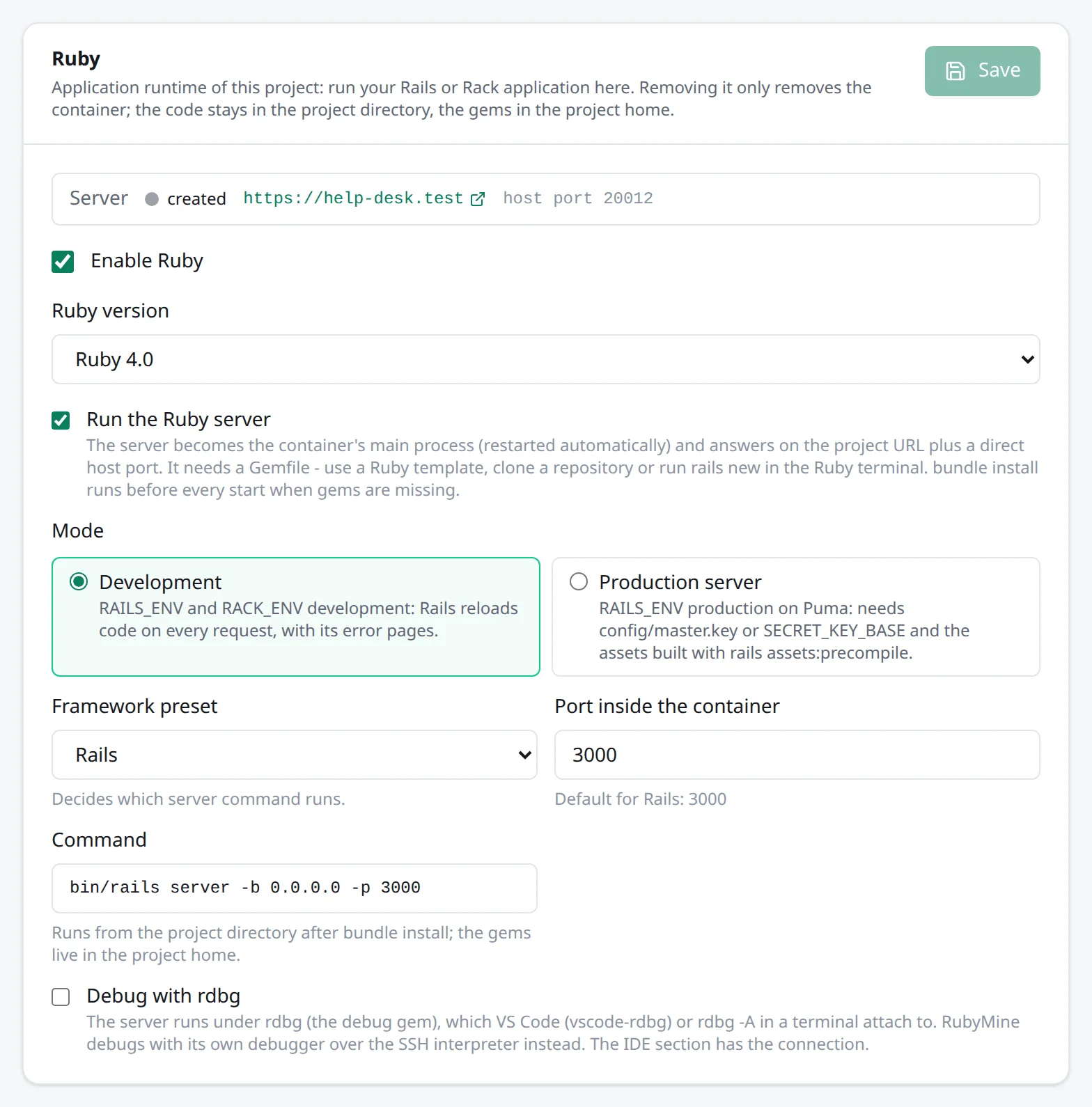
| Preset | Development | Production | Port |
|---|---|---|---|
| Rails | bin/rails server - Rails reloads changed code itself |
bundle exec puma |
3000 |
| Rack | Puma on config.ru (Sinatra, Roda, Hanami …) |
the same | 9292 |
The server listens on $PORT, with HOST and BINDING set to 0.0.0.0. RAILS_ENV, RACK_ENV,
APP_ENV and HANAMI_ENV follow the mode, and your workers get the same values. With the Rack
preset, reloading changed code is up to the framework - sinatra/reloader, for example.
Rails refuses requests for host names it doesn’t know. In development, Envoryx sets
RAILS_DEVELOPMENT_HOSTS=.<base>, so your project’s names get through without you touching
config.hosts.
Production mode really is Rails’ production environment, with everything that implies. It needs
config/master.key (or SECRET_KEY_BASE as a project variable), precompiled assets - run rails
assets:precompile - and the databases your database.yml lists for production. Rails then serves
public/ itself, and if your production config has force_ssl, it redirects to https.
The bundle takes care of itself
Section titled “The bundle takes care of itself”Before the server starts, it waits for the Gemfile (and bin/rails or config.ru). Then it runs
bundle check, and if anything is missing - after a fresh clone, a changed Gemfile or a Ruby
upgrade - bundle install. So a cloned application simply comes up, without you running anything by
hand. If the install fails, the log says so and it tries again every 30 seconds. Workers do the same
before they start.
That check happens at start, though. A server that’s already running keeps the bundle it started
with, so after a bundle add or a Gemfile edit, restart the project. That brings up the server and
the workers with the new gems; until then you’ll see a LoadError for the new gem.
Database
Section titled “Database”Envoryx injects DATABASE_URL, and Rails merges it into config/database.yml on its own. For
PostgreSQL, the Ruby containers get it as postgresql://…, the form Active Record understands. An
additional database called analytics shows up as ANALYTICS_DATABASE_URL, and Rails’ multi-database
setup picks it up for a database named analytics in database.yml.
Solid Queue gets a database of its own, like Rails sets it up for production. The Ruby containers
receive QUEUE_DATABASE_URL, pointing at <database>_queue on the project’s database server, and
Rails merges it into the queue entry of database.yml. Rails 8 writes that entry for production;
the Rails templates add one for development too, and a cable entry next to it. As soon as database.yml has a queue entry,
Envoryx creates the queue database (as the administrator, like the test database), and
rails db:prepare loads Solid Queue’s tables into it.
Solid Cache and Solid Cable work the same way. CACHE_DATABASE_URL points at <database>_cache
and CABLE_DATABASE_URL at <database>_cable, for the cache and cable entries Rails 8 writes
for production, and Envoryx creates those databases when database.yml has the entries. Ruby
projects from before 0.18 report an older setup once because of the two new variables; restart
them when it suits you.
The Rails template leaves the cache in development on :memory_store. If you want Solid Cache there
too, add a cache entry to the development section of database.yml (like the one for
production, with migrations_paths: db/cache_migrate), point config/cache.yml at it with
database: cache, set config.cache_store = :solid_cache_store in development.rb and run rails
db:prepare.
These databases belong to the project like the primary one. Backups and restores include the
_queue, _cache and _cable databases, a duplicate and a restore into a new project bring them
along, and a rename moves them to the new name. So pending Solid Queue jobs survive a restore, and a
copy doesn’t fail on a missing queue database.
Where it answers
Section titled “Where it answers”Without PHP and without a Python or Go server, the Ruby server is the application:
https://<project>.<base> and every extra domain go straight to it, the web container’s port stays
closed, and Direct access is the Ruby host port. Next to PHP, a Python or a Go server it only has
its own host port. A Node.js dev server next to Ruby keeps <project>-dev.<base>.
Templates
Section titled “Templates”Rails runs rails new with Hotwire and importmap, Rails (API only) runs rails new --api.
Both are named after your project and set up for its database - PostgreSQL, MySQL or MariaDB, and
SQLite if the project has none. The first time takes a few minutes while the native gems compile.
If bundle install fails along the way, say for lack of network or a gem that won’t build, the
template fails with the reason instead of leaving half an application behind. Once the project is
up, Envoryx runs rails db:prepare for you; if you created it stopped, run that from the Actions
section before you open the site.
The templates also set up the development environment for working under Envoryx:
- Solid Queue gets its own queue database and Solid Cable its own cable database (see
Database), and Action Cable uses Solid Cable in development instead of the
asyncadapter. Withasync, a Turbo broadcast from a job never leaves the worker process, so it never reaches the browser. For background jobs you add the Solid Queue worker afterwards. lib/tasks/envoryx.rakemakes rails db:prepare load the queue and cable schemas into a database that has nothing but Rails’ bookkeeping tables. Opening the site before the firstdb:preparecreates those tables, anddb:preparewould otherwise take the queue database as done.- With Mailpit in the project, Action Mailer delivers to it. Without that setting Rails tries
localhost:25and silently drops every mail. Links in mails (post_urlin a mailer view) point at the project address fromENVORYX_URL, not at Rails’ defaultlocalhost:3000. - The server and the workers log to stdout as well, so the Logs section shows them;
log/development.logstays. - web-console accepts the networks of the container. Its console still doesn’t open on an error
page you reach through the project URL: web-console checks the browser’s address from
X-Forwarded-For, and that’s your machine, not the proxy. Envoryx leaves it at that on purpose, because the console runs any Ruby code, and opening it to your whole private network would hand that to everyone there. Userails consolein the Ruby terminal instead, or, if you accept the risk, add your own address toconfig.web_console.allowed_ipsindevelopment.rb.
Sinatra writes an app.rb, a config.ru and a Gemfile with Puma, sinatra-contrib for the
reloader and the debug gem.
Active Storage on the object storage
Section titled “Active Storage on the object storage”With object storage in the project, Active Storage can use it as an
S3 service. Add aws-sdk-s3 to the Gemfile and a service to config/storage.yml:
envoryx: service: S3 endpoint: <%= ENV["S3_ENDPOINT"] %> access_key_id: <%= ENV["S3_ACCESS_KEY"] %> secret_access_key: <%= ENV["S3_SECRET_KEY"] %> region: <%= ENV["S3_REGION"] %> bucket: <%= ENV["S3_BUCKET"] %> force_path_style: trueThen set config.active_storage.service = :envoryx. By default Rails sends the browser to a URL
signed for S3_ENDPOINT, http://s3:9000, which only exists inside the project network. The
simplest way out is config.active_storage.resolve_model_to_route = :rails_storage_proxy: Rails
then streams the files itself under the project URL.
Tests that don’t touch your data
Section titled “Tests that don’t touch your data”The Tests section runs bundle exec rspec when there’s a spec/ folder and rspec in Gemfile.lock, and
bin/rails test. A Rails app with rspec-rails gets both suites offered, so you pick the one you use. Both run in the test environment against <database>_test on your project’s
database server.
That last part matters. Active Record merges DATABASE_URL into whatever environment is running, so
a test run would otherwise load its fixtures into your development database and empty its tables.
Envoryx points the run at the test database instead and creates that database first. It does so as
the administrator, because the MySQL and MariaDB project login isn’t allowed to create databases.
Rails then loads the schema. If rspec_junit_formatter is in your bundle, failures show up per test.
rails test writes no report, so Envoryx reads its summary line and the failures Rails prints
(test, message, file and line) from the output, and you get counts and failed tests there too.
Debugging
Section titled “Debugging”Debug with rdbg runs the server under rdbg --open --nonstop from the debug gem, on port 12345
unless you change it, and publishes that port on a host port. When Gemfile.lock locks the debug gem
- Rails and the Sinatra template do - the rdbg from your bundle is used, so there’s only one version of the gem in play.
In VS Code, install the VSCode rdbg Ruby Debugger extension and add this, with host and port from the IDE section:
{ "type": "rdbg", "name": "Attach to Envoryx", "request": "attach", "debugPort": "<host>:<port>", "localfsMap": "/var/www/html:${workspaceFolder}"}From a terminal, rdbg -A <host> <port> does the same.
rdbg takes one client at a time. If an attach doesn’t come back, an earlier session is probably still
connected, for example an rdbg -A in the Ruby terminal you closed without quitting it. End that
process (pkill -f 'rdbg -A' in the Ruby terminal) and attach again.
RubyMine is different. Its Ruby remote debug configuration only speaks ruby-debug-ide, not the
debug gem, so it can’t attach to rdbg. Set up the Ruby container as an SSH remote interpreter instead
(user <project>.ruby, see IDE integration), and RubyMine debugs with its own
debugger. You don’t need the rdbg switch for that, but you do need Allow JetBrains Gateway for this
project in the IDE section, because RubyMine’s debugger forwards a port over SSH.
Without the server, only the port is published - for an rdbg you start yourself in the Ruby
terminal, such as rdbg --open --host=0.0.0.0 --port=12345 -c -- bin/rails test.
Actions and workers
Section titled “Actions and workers”The Actions section has ruby --version, bundle install, bundle update, bundle outdated, rubocop
(when there’s a .rubocop.yml), and for Rails db:prepare, db:migrate, db:rollback, db:seed,
routes, assets:precompile, tmp:clear and about.
For background jobs there are workers for Solid Queue (bin/jobs start), GoodJob
(good_job start, optionally limited to some queues), Sidekiq (optionally with queues - add Redis
to the project and REDIS_URL is injected), a Rake task and a Ruby script. A Solid Queue worker
whose tables don’t exist yet waits with a hint in its log until rails db:prepare has run. The
recurring tasks from config/recurring.yml run inside that same worker, so they don’t need a second
one. More under
Workers and cron jobs.
Adding or removing Ruby later
Section titled “Adding or removing Ruby later”The Ruby card in the Runtime section has an Enable Ruby switch. Turning it off removes the Ruby
container and the containers of the Ruby workers; your files and the worker definitions stay. On the
command line, envoryx takes --ruby <version>, --ruby-server and --ruby-preset rails|rack.