
Go
Start from a Go template in the wizard or pick Go application for an empty project or a
repository, or add Go to any project in the Runtime
section. The container, envoryx-<project>-go, runs ghcr.io/envoryx/envoryx-go:<version>: the official
golang:<version>-bookworm image with three tools added - air
for live reload, Delve for debugging and gotestsum for readable test results.
It runs as PUID:PGID, with your project at /var/www/html and a home directory at
/home/envoryx. GOPATH points to /home/envoryx/go, so anything you go install stays around and
is on your PATH. The module and build caches live in the project’s
package cache, so a module is downloaded once per project, not on every
build. Switch on sharing there, and all your projects download a module only once.
Versions
Section titled “Versions”1.27 is the default, 1.26 is there too - those are the two releases the Go team supports at any time.
If the go line in your go.mod asks for a newer Go than the project runs, the build fails with a
message that doesn’t tell you the fix is one select box away. So Envoryx checks for you: the project
list and the project page show a warning naming both versions. Pick the newer version in the
Runtime section or lower the line in go.mod.
The server
Section titled “The server”Switch on Build and run the server and tell Envoryx which main package to build: . for the
module root, or a path such as ./cmd/server. The container builds it and runs it as its main
process, restarts it if it crashes, and publishes it on a host port of its own. Your code reads the
port from $PORT (8080 by default); HOST is 0.0.0.0. Switch the server off and on again and it keeps that port, so a bookmark to it stays valid.
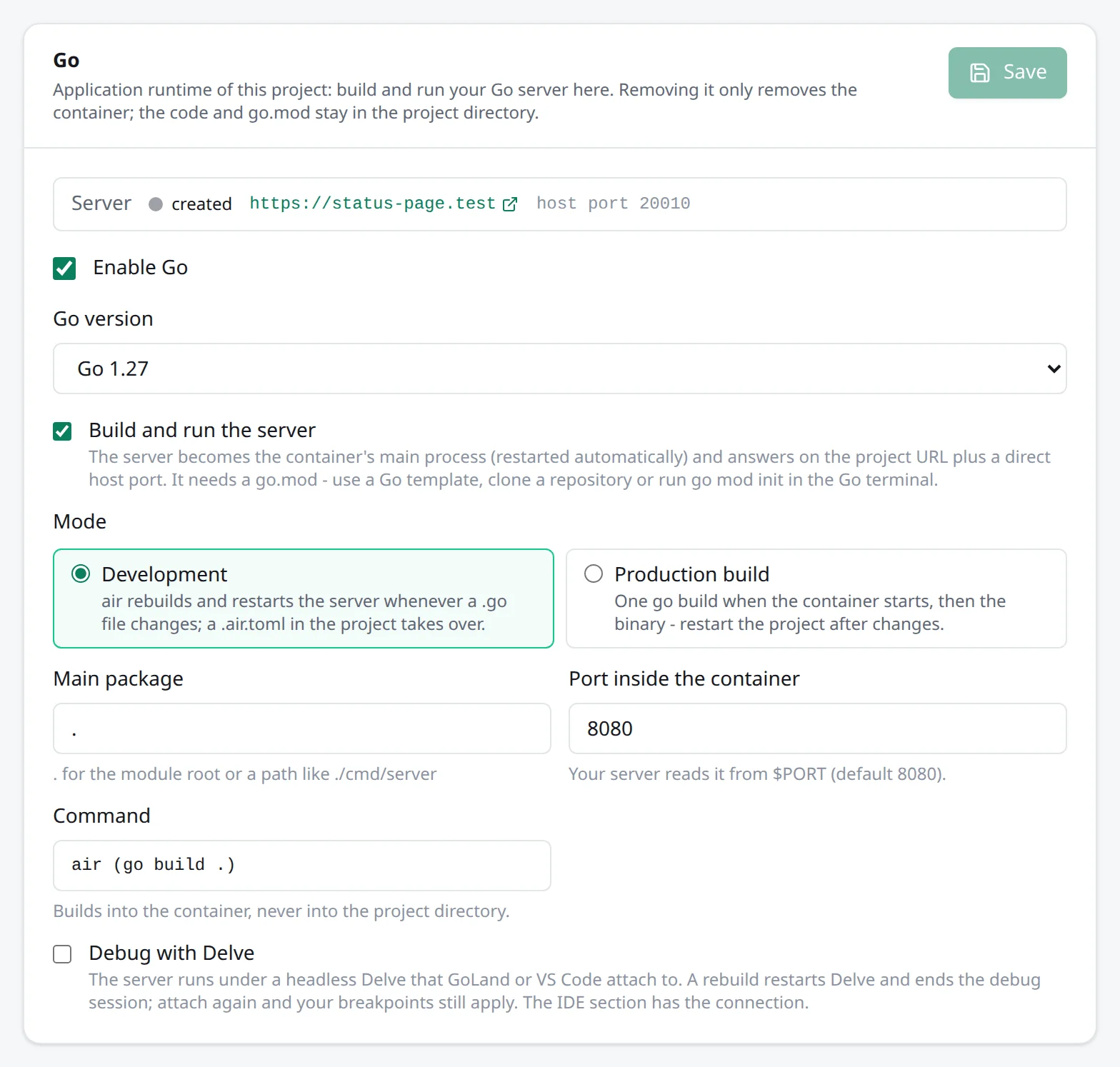
In Development mode air watches your code. Save a .go file and a few seconds later the server
runs the new version - no restart button involved. air only looks at .go, .tpl, .tmpl and .html
files, though, not at go.mod and go.sum. After a go get in the terminal, the server keeps its old build until
you save a .go file again (a plain touch isn’t enough). Production build builds once when the
container starts and then just runs the binary; after a change you restart the project.
The binaries end up in /tmp/envoryx-go inside the container, never in your project folder, so
nothing gets committed by accident. If you bring your own .air.toml, it replaces Envoryx’s air
settings completely. GIN_MODE follows the mode, debug or release, which Gin picks up on its own.
Without PHP and without a Python server, the Go server is the application: https://<project>.<base>
and every extra domain go straight to it, the web container’s port stays closed, and Direct access
is the Go host port. Next to PHP or a Python server it just has its own host port - handy for an API
next to the main application.
Until the project has a go.mod, there’s nothing to build, so the container waits and tells you in
the log (envoryx: waiting for go.mod …). Pick a template, clone a repository or run go mod init
in the Go terminal to get going.
Templates
Section titled “Templates”There are three: Go (net/http) using only the standard library, Gin and Echo. Each runs
go mod init app and writes a main.go with a start route and a health check at /healthz,
listening on $HOST:$PORT. Gin’s main.go trusts X-Forwarded-For from the private address
ranges Docker networks use, so c.ClientIP() gives you the browser’s address instead of the
proxy’s.
Debugging with Delve
Section titled “Debugging with Delve”Debug with Delve builds the server without optimisations, runs it under a headless Delve on port 2345 and publishes that port on a host port. You can keep editing while you debug, with one catch: when air rebuilds, it restarts Delve, and your IDE’s debug session ends (GoLand says “Debugger disconnected unexpectedly”). Attach again and the breakpoints you set are hit as before.
To attach, take host and port from the IDE section. In GoLand that’s a Go Remote configuration (Run →
Edit Configurations). In VS Code use type: go, request: attach and mode: remote, plus a
substitutePath from your local folder to /var/www/html.
Without the server, only the port gets published. That’s for a Delve you start yourself in the Go
terminal, for instance dlv test --headless --listen=:2345 ./pkg/... to step through a test.
If you use your own .air.toml, its build.full_bin has to start the binary under dlv exec
itself - Envoryx can’t do that for you then.
Actions, tests and workers
Section titled “Actions, tests and workers”The Actions section offers go version, go build ./..., go vet ./..., gofmt -l ., go mod tidy,
go mod download and go generate ./.... The Tests section runs go test ./... through gotestsum, so a
failure shows up per test instead of as a wall of output - see
Actions and tests.
For anything that should run next to the server, like a queue consumer, the Go program worker builds a package and runs the binary. More under Workers and cron jobs.