
Python
Start from a Python template in the wizard or pick Python application for an empty project or a
repository, or add Python to any project in the
Runtime section. You get a container called envoryx-<project>-python, built from
ghcr.io/envoryx/envoryx-python:<version>. It has pip, uv and git, plus the build dependencies that
common packages need when there’s no ready-made wheel. It runs as PUID:PGID, with your project at
/var/www/html and a home directory at /home/envoryx that survives container restarts.
Your packages live in the project’s own virtual environment, /var/www/html/.venv. The container’s
PATH starts with .venv/bin, so as soon as the venv exists, python, pip, gunicorn, uvicorn
and friends are the ones from your project - in the terminal and over SSH alike. You never have to
remember to activate it.
Versions
Section titled “Versions”3.14 is the default. 3.13, 3.12, 3.11 and 3.10 are there as well, and 3.15 as a preview.
Switching the version later is a bigger step than it looks, because the .venv belongs to one
Python version: its packages sit in .venv/lib/python3.14/site-packages, and a 3.13 interpreter
doesn’t look there. Your server would die on its first import. So after a switch the application
server and the Python workers wait, with a line in their log, until the venv matches again, and
the project overview says what’s going on. Since they wait instead of crashing, the Actions section
stays usable, and that’s where the fix is: pip install -r requirements.txt throws the old venv
away and builds a new one from requirements.txt (in a uv project, uv sync does the same). Before
it does, it prints the packages the old venv had. Anything you once installed with a plain
pip install and never wrote down shows up in that list, so you can add it to requirements.txt
and install it again. The server keeps waiting while pip or uv is still filling the new venv, so it
doesn’t start half-way and take the install down with it. Once the venv is complete, the server
starts by itself.
Running the application server
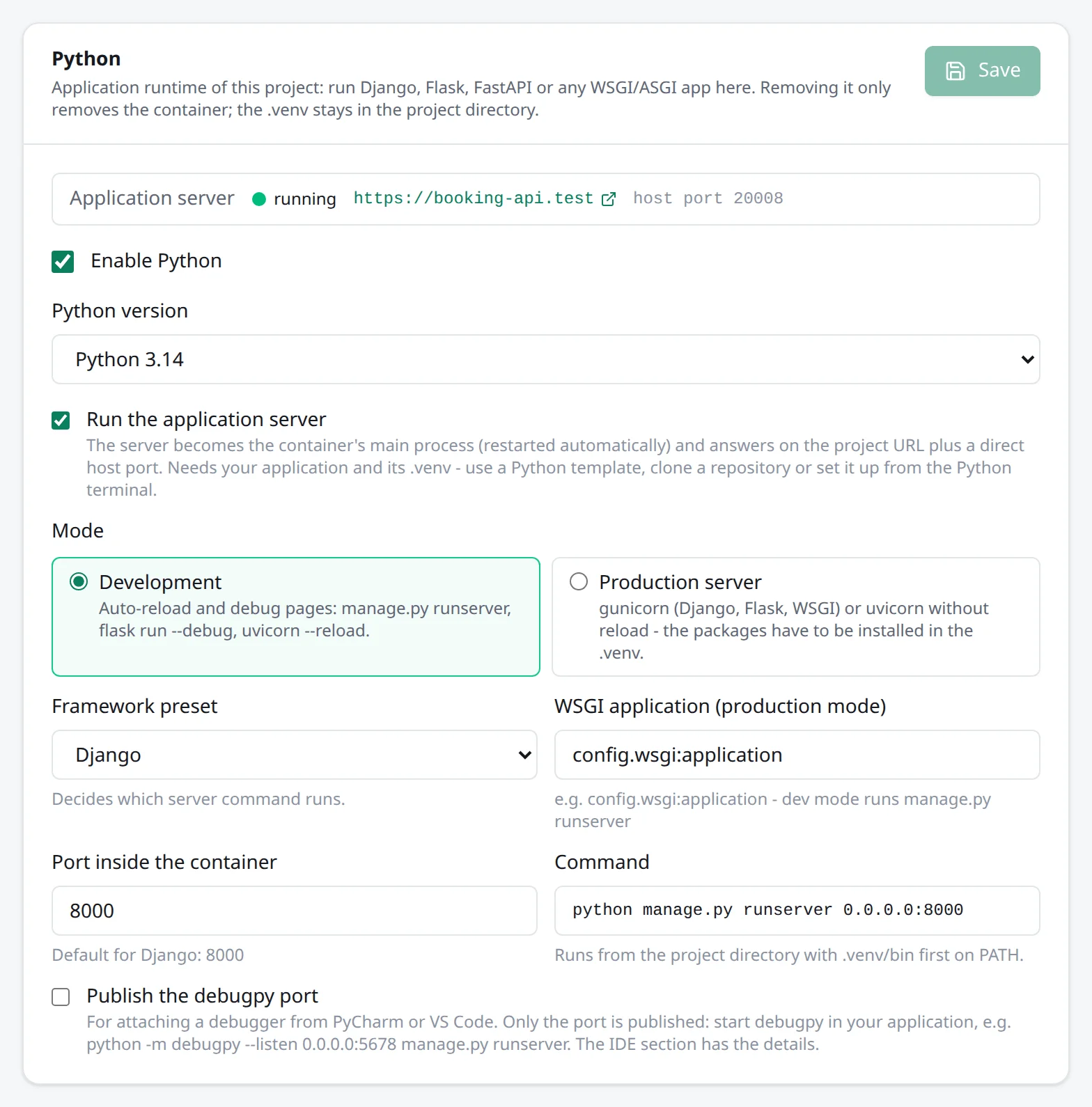
Section titled “Running the application server”Switch on Run the application server and the preset’s command becomes the container’s main process: restarted automatically if it dies, and published on a host port of its own.
| Preset | Development | Production |
|---|---|---|
| Django | python manage.py runserver 0.0.0.0:<port> |
gunicorn <app> with the WSGI module, e.g. config.wsgi:application |
| Flask | flask --app <app> run --debug |
gunicorn |
| FastAPI / ASGI | uvicorn <app> --reload |
uvicorn without reload |
| WSGI | gunicorn <app> --reload |
gunicorn |
| Other | python -m <module>, reading HOST and PORT |
- |
You name your application as module:attribute, like main:app or app:app. For production mode,
gunicorn or uvicorn has to be installed in the .venv; the templates take care of that.
The container sets FORWARDED_ALLOW_IPS=*. uvicorn and gunicorn only believe X-Forwarded-Proto
and X-Forwarded-For from 127.0.0.1 by default, but here every request comes from Envoryx’s proxy
on the project network. Without the variable FastAPI builds http:// URLs, and its trailing-slash redirect throws you off
HTTPS.
Without PHP, the Python server is the application. https://<project>.<base> and every extra domain
go straight to it, the web container’s port stays closed, and Direct access in the Domains section is
the Python host port. A common setup is a Django or FastAPI backend with a Vite frontend: add a
Node.js dev server and it keeps <project>-dev.<base> for itself. Next to PHP, the Python server
only gets its own host port. That port stays reserved while you switch the server off, so it comes
back on the same number and your bookmarks and IDE run configurations keep working.
A brand-new project has nothing to start yet. Rather than crash-looping, the container waits for the
entry file to appear (manage.py for Django, otherwise <module>.py or a <module>/ folder) and
then for the server’s package in the .venv: django or flask (gunicorn for both in
production mode), uvicorn for ASGI, gunicorn for WSGI. The log says waiting for uvicorn in .venv until you run pip
install -r requirements.txt or uv sync from the Actions section, which is also what you do after
a fresh clone. While a pip or uv install is running, the server waits for it to finish.
Templates
Section titled “Templates”Django runs django-admin startproject config . and prepares the settings for Envoryx’s proxy.
It also sets up dj-database-url, so the injected DATABASE_URL is used automatically, and sends
mail over SMTP to Mailpit while the project has it (SMTP_HOST, SMTP_PORT). Run manage.py
migrate from the Actions section afterwards.
The settings get WhiteNoise and STATIC_ROOT (staticfiles/) too, because gunicorn serves no
static files in production mode: without them, /static/ answers 404 and the manage.py
collectstatic action has nowhere to write. A Django project created from the template before
Envoryx 0.18 needs that by hand: pip install whitenoise (and add it to requirements.txt), then
add to config/settings.py:
STATIC_ROOT = BASE_DIR / "staticfiles"MIDDLEWARE.insert(MIDDLEWARE.index("django.middleware.security.SecurityMiddleware") + 1, "whitenoise.middleware.WhiteNoiseMiddleware")WHITENOISE_USE_FINDERS = TrueWhiteNoise only covers static files, not uploads. Files under MEDIA_URL aren’t served by gunicorn
or WhiteNoise, so in production mode they answer 404. Django’s static() helper in urls.py serves
them in development mode only (it does nothing without DEBUG, which the template ties to the
runtime mode via DJANGO_DEBUG). And if you add an ImageField, pip install pillow and put it into
requirements.txt; it isn’t there by default.
Flask gives you an app.py that wraps the app in Werkzeug’s ProxyFix, so
url_for(..., _external=True) and redirects stay on https://<project>.<base>. FastAPI gives
you a main.py with the API docs at /docs. Flask’s error page in debug mode shows the traceback on every
URL, but its interactive console only accepts requests addressed to localhost or 127.0.0.1. On the
Docker host itself, open http://127.0.0.1:<port> with the Python host port (Domains section,
Direct access) to use it; the PIN it asks for is in the Logs section.
All three create the .venv, install the packages and pin them in requirements.txt. That way,
after a fresh clone, pip install in the Actions section brings back exactly the same environment.
They also write a .gitignore for the .venv and the bytecode caches, and in Django for
staticfiles/, media/ and the SQLite file.
Debugging
Section titled “Debugging”Publish the debugpy port in the Runtime section puts port 5678 on a host port - with or without the application server, so you can also debug a script or a test run you start in the terminal. The IDE section shows host, port, path mapping and ready-made snippets for the usual servers.
Envoryx only publishes the port; debugpy itself is up to you. Install it into the .venv and let
your app start it. Where you do that matters, because the development servers run your code in a
child process that their reloader restarts on every change. A debugpy in front of the server, as in
python -m debugpy … manage.py runserver, would sit in the parent and compete with the child for
the port. So start it in the child only:
# Django: in manage.py, before execute_from_command_line(...)if os.environ.get("RUN_MAIN") == "true":    import debugpy; debugpy.listen(("0.0.0.0", 5678))
# Flask: at the top of app.pyimport osif os.environ.get("WERKZEUG_RUN_MAIN") == "true":    import debugpy; debugpy.listen(("0.0.0.0", 5678))
# FastAPI / uvicorn --reload: at the top of main.py (only the worker imports it)import debugpy; debugpy.listen(("0.0.0.0", 5678))
Then attach VS Code with type: debugpy and request: attach. Every code change restarts the child
and ends the session, so attach again after you save.
PyCharm’s Python Debug Server works the other way round: the IDE listens and your code connects to
it. In PyCharm’s pydevd-pycharm snippet, use host.docker.internal as the host when PyCharm runs
on the Docker host; every runtime container resolves that name to the host. If PyCharm runs on
another machine, forward the port over SSH with the project’s SSH login
(ssh -R <port>:localhost:<port>, which listens on the container’s localhost) and use localhost.
Actions, tests and workers
Section titled “Actions, tests and workers”The Actions section covers python --version, python -m venv .venv, pip install -r requirements.txt
(which creates the venv first if it’s missing), pip freeze, uv sync and uv lock when there’s a
pyproject.toml, and Django’s migrate, makemigrations, collectstatic, check and flush.
pytest and Django’s own test runner are picked up by the Tests section - see
Actions and tests. Django’s runner and pytest-django
(pytest next to a manage.py) create their test database as test_<database>. The MySQL and MariaDB project login isn’t allowed to create databases, so
Envoryx creates that one first, as the administrator, and grants it to the login; your development
data stays out of it. Django reads DATABASE_URL through dj-database-url, and for PostgreSQL the
Python container gets it as postgresql://, the spelling SQLAlchemy and psycopg understand. For background jobs there are the Python
script, Python module, manage.py command (think rqworker or qcluster), Celery worker and
Celery beat workers, described under Workers and cron jobs.
Adding or removing Python later
Section titled “Adding or removing Python later”The Python card in the Runtime section has an Enable Python switch. Turning it off removes the Python
container and the containers of the Python workers. Your files, the .venv and the worker
definitions stay where they are, so switching it back on picks up where you left off.