
Troubleshooting
Something isn’t working? Here are the problems people run into most, and how to get out of them.
Start with Diagnostics
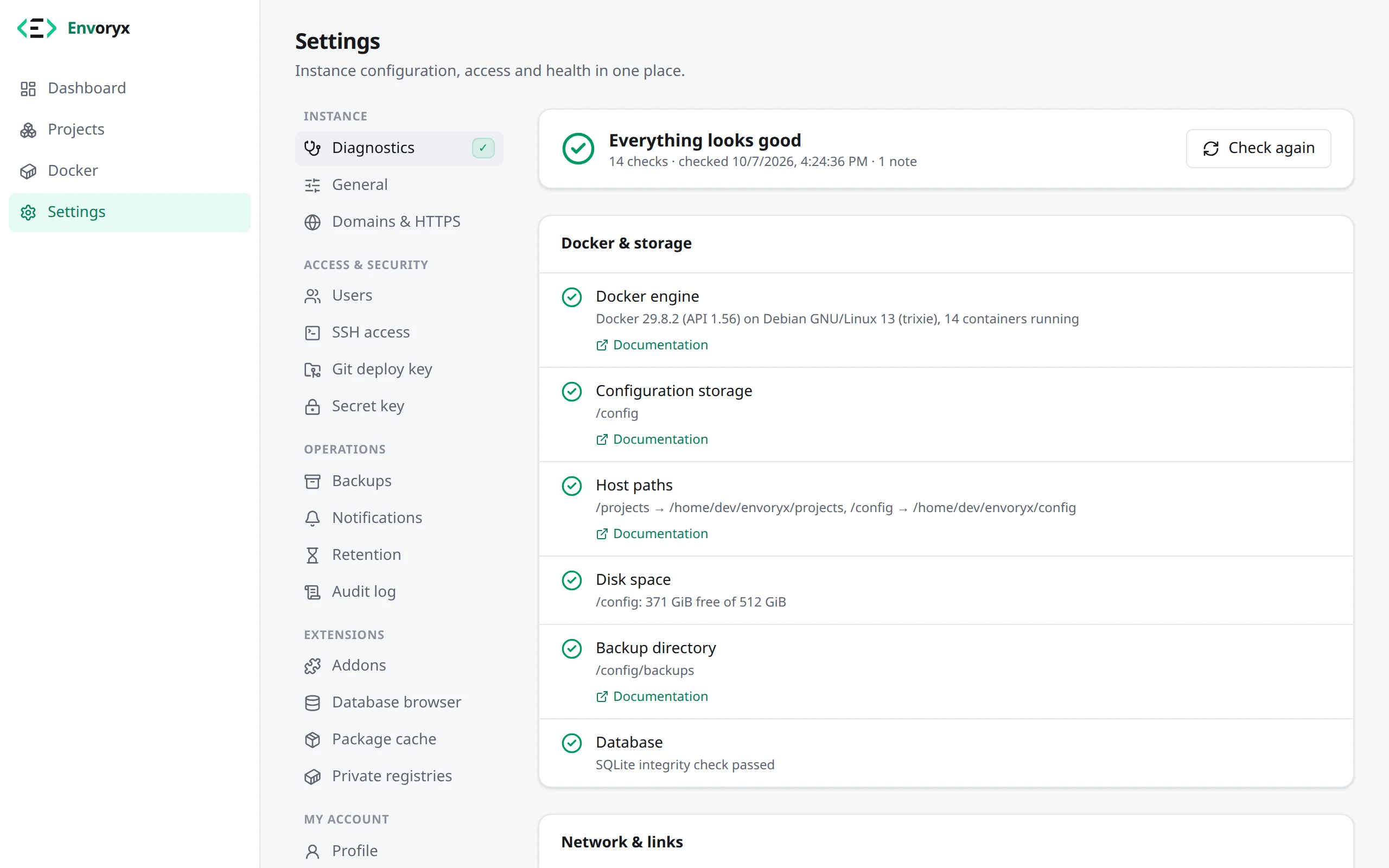
Section titled “Start with Diagnostics”Before you dig anywhere else, open Settings → Diagnostics. It checks your whole set-up and
tells you for every finding what it looked at, what it found and how to fix it. It covers the
Docker engine, where /config lives, host paths, disk space, the backup directory, database
integrity, the host for project links, proxy ports, wildcard DNS, SSH, HTTPS, the version,
whether projects and Docker agree, and notifications. Findings with a button can be fixed right
there. As long as there are warnings or errors, the dashboard lists them at the top. From a
shell, envoryx diagnostics prints the same (see Command line); it ends
with exit code 1 when something is broken, so you can put it in a monitoring job.
Wildcard DNS is checked twice, and it’s worth knowing why. The check from your browser is the one that matters - it also proves your device trusts the CA. The second check runs inside the Envoryx container, which often uses a different DNS server, so the two can disagree. It compares the answer with the host for project links. If you haven’t set one, it asks the address the name points at for a probe host and only says OK when this instance’s proxy answers there. Another server answering is a warning, no answer at all leaves the result unverified.
“Host paths could not be detected”
Section titled ““Host paths could not be detected””Project containers get your files through bind mounts, and the Docker daemon resolves those on
the host, not inside Envoryx. So Envoryx needs to know which host folders are behind /projects
and /config; it finds out by looking at its own container. If that fails, the dashboard shows a
red notice and you can’t create projects until you tell it yourself:
ENVORYX_PROJECTS_HOST_PATH=/srv/envoryx/projectsENVORYX_CONFIG_HOST_PATH=/srv/envoryx/configOn Unraid, always use the same /mnt/user/… (or /mnt/cache/…) paths you used in the volume
mappings.
Envoryx refuses to start: network filesystem
Section titled “Envoryx refuses to start: network filesystem”/config holds an SQLite database, and SQLite needs file locks that actually work. On NFS,
SMB/CIFS, 9p or Ceph they often don’t, and the database would get corrupted without anyone
noticing. That’s why Envoryx refuses to start there. Use a local folder instead.
ENVORYX_ALLOW_NETWORK_FS=true turns the check off, at your own risk.
On Unraid, /mnt/user/… (FUSE) works but shows a warning; /mnt/cache/appdata/envoryx or
Exclusive access for the appdata share is the safer choice.
Project links point to the wrong address
Section titled “Project links point to the wrong address”Project web servers, Mailpit, database ports and object storage publish their ports on the Docker
host, and Envoryx builds its links from the address you have in your browser. If you reach
Envoryx under a different address than the Docker host - because it has its own IP on
br0/macvlan, or sits behind a reverse proxy - the links point to the wrong place. Set the right
host under Settings → Domains & HTTPS → Project links & developer machine (or with
ENVORYX_PUBLIC_HOST). When Envoryx notices it has an IP of its own, it offers the Docker host
with one click.
https://shop.test doesn’t open
Section titled “https://shop.test doesn’t open”It’s almost always one of four things:
- The name doesn’t resolve - the wildcard DNS entry is missing or points to the wrong address; see Domains & HTTPS. If Envoryx has its own IP, the entry has to point to that IP.
- Certificate warning - the local CA isn’t installed on this device yet (Firefox keeps its own store, so it needs it separately).
- No proxy port - 80/443 aren’t published; Settings → Domains & HTTPS warns you about that.
- A 502 page - the project’s application server isn’t listening yet. Its logs tell you why:
lines starting with
envoryx: waiting for …say what it’s waiting for.
Stopping takes too long, operations are “interrupted”
Section titled “Stopping takes too long, operations are “interrupted””When Envoryx stops, it gives running operations ENVORYX_SHUTDOWN_GRACE (8 s by default) to
finish. That has to stay below the container’s stop timeout, otherwise Docker kills the process
first. The docker run command and the compose file from the installation page use a 90 s stop
timeout with ENVORYX_SHUTDOWN_GRACE: 80s. On Unraid the stop timeout is a global setting
(Settings → Docker → Docker stop timeout); raise it together with the template’s
Shutdown grace.
An operation that a restart cut off is marked interrupted by an Envoryx restart. Just run it again.
Creating a project fails: no address range left
Section titled “Creating a project fails: no address range left”Every project has its own Docker network, and it keeps it while it’s stopped. Envoryx gives each
new network a /24 out of ENVORYX_NETWORK_POOL (10.213.0.0/16 unless you set it), which is room for
256 projects. When all of them are taken, creating the next project fails and says so: delete
projects you no longer need or give the pool a larger range. If 10.213.0.0/16 is already used in
your LAN or VPN, set another range on the Envoryx container; networks that already exist keep
theirs. With off, Docker picks the ranges again, and its defaults run out after about 30 networks.
A project doesn’t start: host port in use
Section titled “A project doesn’t start: host port in use”Envoryx hands out host ports from ENVORYX_PORT_RANGE_START to _END (20000 to 20999 unless you set
them) and skips the ones already taken: by other projects, by Docker containers and by programs on
the Docker host itself, such as a JetBrains IDE or a database installed there. It sees the last
group through a short-lived busybox container in the host network. If a program grabs the port
later, while the project is stopped, the project moves to a free HTTP port at its next start; it’s
reachable at its .test address either way, only the direct port changes. For any other port the
start stops with host port in use and names the port: quit the program that holds it, or switch
that port’s publishing off and on again on the card where you turned it on, which hands out a
free one.
Orphaned containers and volumes
Section titled “Orphaned containers and volumes”Sometimes a container, network or volume carries Envoryx’s labels, but its project no longer
exists - after restoring an older instance backup or a delete that didn’t finish. That’s an
orphan. Envoryx removes orphaned containers and networks by itself after about
a minute. Volumes are different: they hold data, so Envoryx never removes them on its own. They
stay on the Docker page with a Remove button until you decide. And if you create a project
under the same name again, it picks its old volumes back up. From a shell,
envoryx docker orphans lists them and envoryx docker remove volume <name> --yes removes one
(see Command line).
That automatic clean-up only covers what this instance labelled itself. Orphans without an instance label were created by an Envoryx older than 0.18, and they may just as well belong to another instance on the same host. The Docker page marks them older Envoryx, and they stay until you remove them there. They aren’t this instance’s leftovers, so they don’t count as its orphans either: the dashboard leaves them out of its orphan count, and Projects vs. Docker in the Diagnostics mentions them without a warning. Only this instance’s own orphans raise one.
A wiped /config is a different story. The fresh start creates a new instance ID, so the old
project containers aren’t orphans at all but another instance’s: Envoryx leaves them alone, and a
restored project that wants its old names fails with the name is taken by another Envoryx
instance on this Docker host. Restoring the instance backup
takes the old ID over by itself as long as no other Envoryx container is on the host. If there is
one, do it by hand: read the old ID from a container’s envoryx.instance label, stop Envoryx, write it into
/config/instance-id and start Envoryx again.
docker inspect -f '{{ index .Config.Labels "envoryx.instance" }}' <a project container>Lost access
Section titled “Lost access”Forgot the password, or locked out for another reason? You can reset the credentials from a shell inside the running container, and nothing else gets touched:
docker exec -it envoryx envoryx admin users # which accounts existdocker exec -it envoryx envoryx admin reset-password # new password, printed oncedocker exec -it envoryx envoryx admin reset-password --user alex --password 'my new password'docker exec -it envoryx envoryx admin logout-all # end every browser sessiondocker exec -it envoryx envoryx admin revoke-tokens # delete every API tokendocker exec -it envoryx envoryx admin revoke-token ci # just one, by name, id or prefixdocker exec -it envoryx envoryx admin reset --yes # remove all accounts → the setup page returnsreset deletes accounts, sessions and API tokens, but leaves projects, settings and backups
alone. On Unraid, the container’s console (Docker → Envoryx → Console) is the same shell. And if
you’ve just tried a few wrong passwords: failed sign-ins are slowed down for up to 15 minutes, so
give it a moment.
Health endpoint
Section titled “Health endpoint”GET /api/v1/health answers without authentication. It only fails (503) when the database is
unusable. An unreachable Docker engine shows up as "docker": false with the status degraded,
but the answer is still 200 - otherwise auto-heal tools would restart Envoryx in a loop while
Docker is down.