
PHP
Laravel, Symfony, WordPress and friends run in their own PHP container. You get it with a PHP template in the wizard or by picking PHP application for an empty project or a repository, and you can add it to any other project later with the Enable PHP switch in the Runtime section.
That container, envoryx-<project>-php, runs PHP-FPM. The image is
ghcr.io/envoryx/envoryx-php:<version>: the official php:<version>-fpm with Composer and every
extension Envoryx offers already compiled in. Your project’s web server talks to it over FastCGI, so
from the browser it looks like any classic PHP setup.
Which version
Section titled “Which version”8.5 is the default for new projects. 8.4, 8.3 and 8.2 are fully supported, and 8.6 is there as a preview if you want to try what’s coming. For older applications that won’t move yet, 8.1, 8.0 and 7.4 are still available, even though PHP itself no longer maintains them.
The preview has gaps: redis, imagick, memcached, amqp, mongodb and Xdebug don’t build for
8.6 yet. The Runtime section greys them out for that version, and Envoryx refuses them rather than
leaving you with an extension that’s silently missing.
You switch the version in the Runtime section. Envoryx rebuilds its images every week from the official ones. A Restart of the project picks up a new patch release, and if a new image breaks something, Roll back on the Overview takes you back to the previous one - more on that under Project lifecycle.
Web server and document root
Section titled “Web server and document root”Every project has a web server container next to PHP. Caddy is the default, and Nginx is
there too. Both hand every path that isn’t a real file to index.php, so front controllers work
without any rewrite rules: Laravel and Symfony routes, and WordPress permalinks like Post name
as well. Take Apache if your application keeps rules of its own in .htaccess files, say a
WordPress plugin that writes redirects or access rules there, because Apache is the only one of
the three that reads them. You can switch between all three after the project exists.
The document root is the folder the web server serves, relative to the project directory. For
Laravel and Symfony that’s public.
PHP files in upload and cache folders don’t run, on any of the three servers: below WordPress’
wp-content/uploads (Bedrock’s app/uploads and installs in a subfolder too), Drupal’s
sites/*/files, TYPO3’s fileadmin and typo3temp, Shopware’s and Magento’s media and
thumbnail, Craft’s cpresources and its usual asset volumes assets and images, Laravel’s
storage link and a plain uploads folder, a request for a .php file gets a 403. The CMS folders
count wherever they are, so an install in a subfolder is covered; the general names (uploads,
media, thumbnail, storage, assets, images) only directly below the document root. If you
give a Craft volume another name, put it below uploads. That’s where an upload form puts files, and a script slipped in that way would otherwise run
like your own code. The CMSs bring .htaccess rules for this, but only Apache reads them. Images
and everything else in those folders are served as usual, and Drupal’s image styles still get
generated.
HTTPS behind the proxy
Section titled “HTTPS behind the proxy”TLS ends at Envoryx’s proxy, and the web server next to PHP only gets plain http from it. PHP would
then think every request came in over http, and frameworks build their links and redirects from
that: a login form posting to http, Symfony’s toolbar blocked as mixed content, an installer
redirecting you away from https. So the generated Caddy, Nginx and Apache configs translate the
proxy’s X-Forwarded-Proto into what PHP would see behind its own TLS endpoint: HTTPS=on,
REQUEST_SCHEME=https and the port the browser used (443 when the address has none). Laravel,
Symfony, Shopware, TYPO3 and WordPress build https:// links on their own, and you don’t need to
set up trusted proxies for it. Plain http and the direct port
keep the web server’s own values. SERVER_NAME is the host the browser asked for on all three
servers (Nginx would otherwise hand PHP its catch-all name _), which matters for TYPO3’s trusted
hosts check.
Extensions
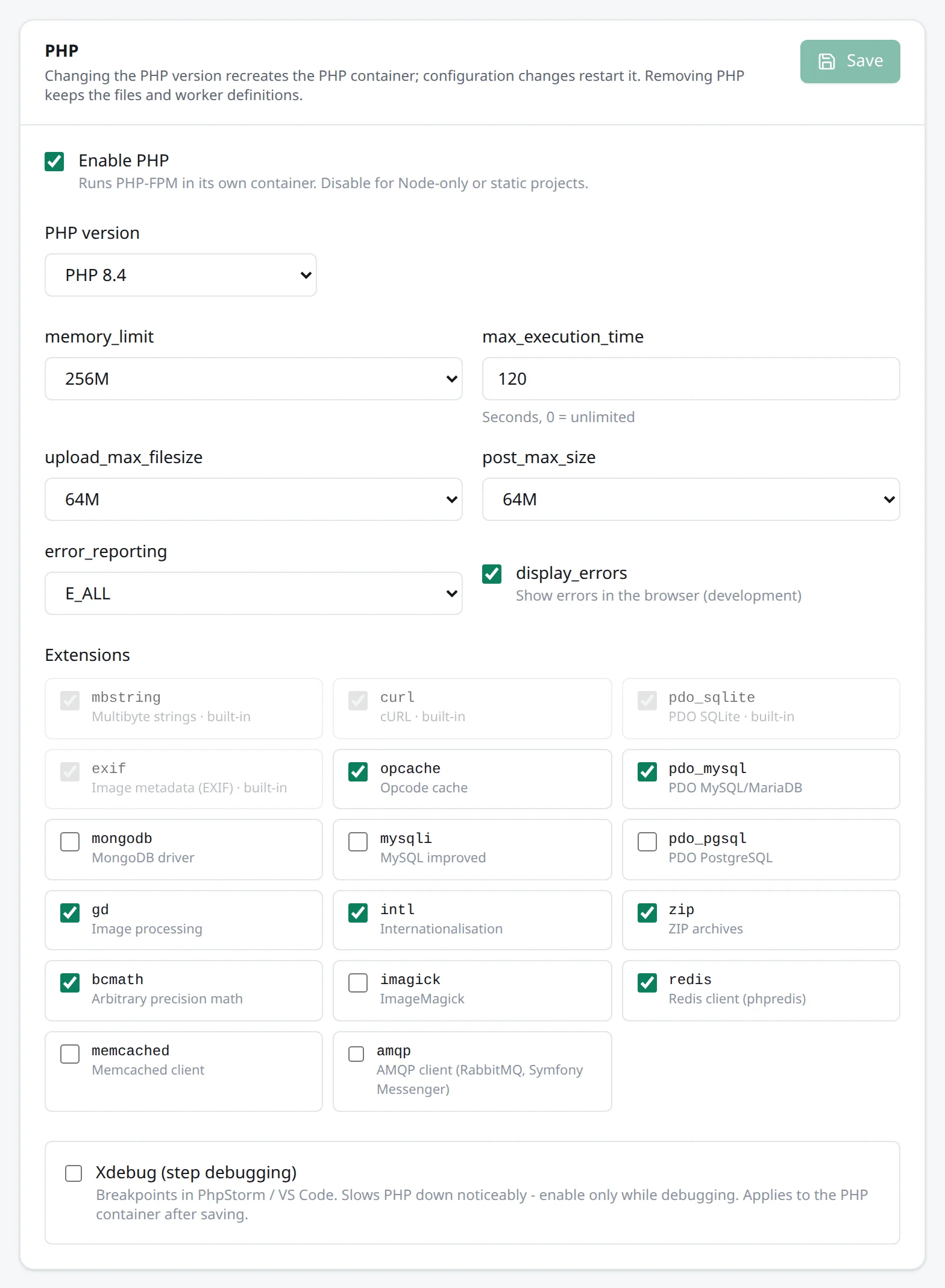
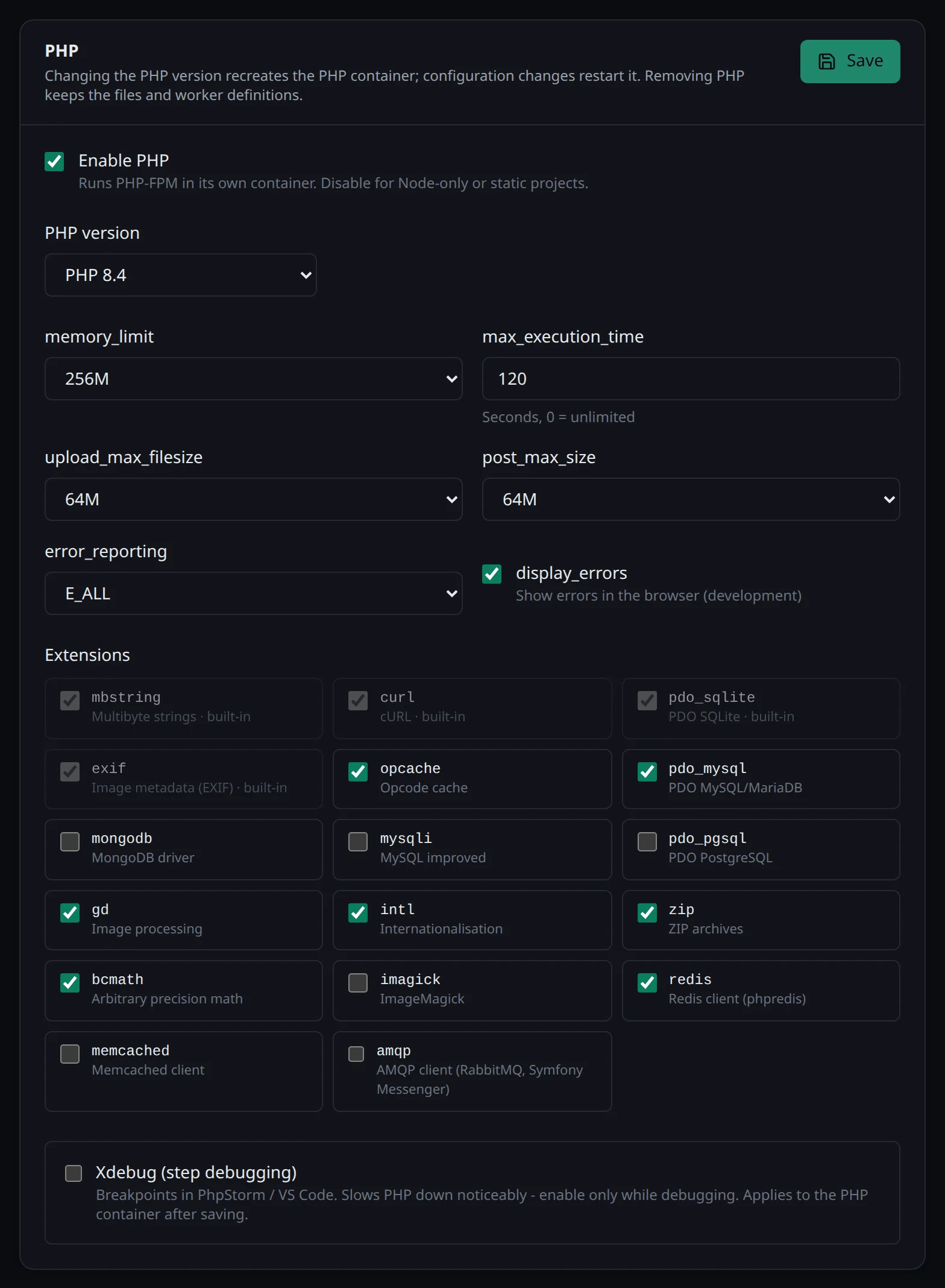
Section titled “Extensions”mbstring, curl, pdo_sqlite and exif are always on (mbstring in every PHP image, 8.6
included, even though the upstream 8.6 image no longer compiles it in; exif, which WordPress,
Drupal and TYPO3 use for the orientation of photos, isn’t in any of the upstream images). Everything else you switch per project in the
Runtime section. Since every extension is already in the image, nothing gets rebuilt when you do.
| Extension | What it’s for |
|---|---|
opcache |
Opcode cache |
pdo_mysql, mysqli |
MySQL / MariaDB |
pdo_pgsql |
PostgreSQL |
mongodb |
MongoDB driver |
gd, imagick |
Image processing, ImageMagick |
intl |
Internationalisation |
zip |
ZIP archives |
bcmath |
Arbitrary precision math |
redis |
Redis client (phpredis) |
memcached |
Memcached client |
amqp |
AMQP client (RabbitMQ, Symfony Messenger) |
A new project starts with bcmath, gd, intl, opcache, pdo_mysql and zip. Templates add
whatever their application needs on top. Some services bring their client along: adding PostgreSQL
switches on pdo_pgsql, Redis redis, Memcached memcached and RabbitMQ amqp, because Laravel’s
phpredis default, the Memcached cache drivers and Symfony Messenger’s AMQP transport otherwise stop
with class not found. If you switch one of them off again yourself, it stays off.
php.ini
Section titled “php.ini”The defaults are generous enough for development, and errors are shown in full so you notice them:
| Setting | Default |
|---|---|
memory_limit |
256M |
upload_max_filesize |
64M |
post_max_size |
64M |
max_execution_time |
120 |
display_errors |
on |
error_reporting |
E_ALL |
date.timezone |
UTC |
max_input_vars |
5000 |
Everything but the last two is a field in the PHP card. max_input_vars is higher than PHP’s 1000
because big backend forms (TYPO3, shop and page builder backends) have more fields than that, and
PHP drops the rest without an error, so they just aren’t saved. The Shopware template starts with a
memory_limit of 1G, because Shopware asks for more than 256 MB, and TYPO3 with 512M, which its
install tool asks for; the other templates keep the default. A project created through the API or
the CLI gets the same defaults for every setting it leaves out.
With opcache switched on, PHP looks at the file’s timestamp on every request
(opcache.validate_timestamps=1, opcache.revalidate_freq=0). That costs a little speed, but the
next request runs exactly the file you just saved, which is what you want while you develop.
OPcache also gets more room than PHP’s defaults (256 MB, 32 MB for strings, 32531 files), because a
Shopware or Magento vendor/ directory fills those, and OPcache then compiles again on every
request.
mail() goes to Mailpit when the project has it; without
Mailpit it returns false.
Tools in the container
Section titled “Tools in the container”Besides PHP and Composer, the image brings what CMSs and frameworks expect to find on a server.
WP-CLI is there as wp, so wp search-replace or wp plugin list work in the PHP terminal.
ImageMagick’s command line tools are there for TYPO3, which resizes and crops images with them
rather than through the imagick extension. The MariaDB client (mysql, mysqldump) and the PostgreSQL client
from the newest major release make drush sql:*, wp db, artisan db and your own deploy scripts
work. And because TYPO3 site configurations name a locale like en_US.UTF-8, the UTF-8 locales for
en_US, en_GB, de_DE, de_AT, de_CH, fr_FR, es_ES, it_IT, nl_NL, pt_BR and pl_PL are generated. Next to
those you’ll find git, rsync and msmtp, which hands mail() to Mailpit.
If something is still missing, a custom image built on the Envoryx one adds it.
Step debugging with Xdebug
Section titled “Step debugging with Xdebug”Turn on Xdebug (step debugging) in the PHP card in the Runtime section. Envoryx then runs Xdebug on
port 9003 in debug,develop mode with start_with_request=yes, so every request tries to reach your
IDE.
Xdebug connects back to the machine that made the request. Behind Envoryx’s proxy it finds that
address in X-Forwarded-For. If that doesn’t work out, it falls back to the developer machine you
set under Settings → Domains & HTTPS → Project links & developer machine, or to the override on
the project itself, and last to host.docker.internal, the Docker host. That last one is enough when
PhpStorm runs on the Docker host. It isn’t your workstation, though: if the IDE runs on another
machine that the server can’t reach, forward the port over SSH with the project’s SSH login
(ssh -R 9003:localhost:9003) and set Debugger host (optional) in the PHP card to localhost.
In your IDE, map /var/www/html to your project folder. The IDE section shows the exact settings
for PhpStorm and VS Code. When you’re done, switch Xdebug off again - it makes PHP noticeably slower.
PhpStorm decides which of its servers (and so which path mapping) a debug session belongs to by
host and port. Behind the proxy the browser’s port is 443, not the 80 a new server entry gets by
default, and a mismatch ends the session with Cannot bind file /var/www/html/index.php to the web
server project in the log, while your breakpoints are simply skipped. Envoryx therefore sets
PHP_IDE_CONFIG=serverName=<project host> in the PHP container, which names the server directly,
for browser requests and for artisan, drush or tests on the command line alike. Create the
server in Settings → PHP → Servers with exactly that name, or take the php.xml from the IDE
section, which carries the right name and port. Switching Xdebug on or off restarts only the PHP
container, its workers and the web server; the database keeps running.
Templates
Section titled “Templates”Laravel, Symfony (skeleton plus the webapp pack), WordPress, Drupal with Drush, TYPO3, Shopware and
Craft CMS. Creating projects walks through
them. How you finish the setup depends on the application. WordPress only has its browser
installer, so you open the site and fill in the site title and admin account there. Drupal, TYPO3
and Craft give you the choice between their web installer and an action in the Actions section;
the actions print the admin password at the end. Shopware’s action creates the administrator
admin with the password shopware, so change that in the admin at /admin once you’re in.
The Laravel template leaves QUEUE_CONNECTION, CACHE_STORE and SESSION_DRIVER at database,
as Laravel’s .env has them. Envoryx hands the app the REDIS_* variables when you add Redis, but
it doesn’t switch these over, so a job only goes to Redis once you set QUEUE_CONNECTION=redis in
the Environment section or in .env (the redis extension is already on, since adding Redis
switched it on). For a Laravel s3 disk on the project’s
object storage, install the S3 driver first with
composer require league/flysystem-aws-s3-v3; the template doesn’t bring it. Once the new project is up, Envoryx runs artisan migrate
for it, so the tables for jobs, cache and sessions are there before the first request and before a
queue worker starts. A project you create stopped gets it from the Actions section.
The Symfony template has Doctrine read its server_version from DB_SERVER_VERSION, which
Envoryx sets for the databases it runs. With a rolling version such as MariaDB 11 that’s
mariadb-11.0.0, even when the server is already at 11.8. That’s on purpose: Doctrine then picks a
platform the server surely supports, and the value doesn’t change under you with every image
update. If you need the features of a later minor release, set DB_SERVER_VERSION yourself in the
Environment section.
The PHP container has Node.js 24 with npm and yarn (pnpm comes along on its first use), so
npm install and npm run build work right in the PHP terminal: Vite in a Laravel app, a Drupal or
TYPO3 theme, a WordPress block. For a dev server with hot reload, switch on Enable Node.js in the
Runtime section: Node then runs in a container of its own on the same project directory, and the
npm actions show up in the Actions section. The Node.js page has the rest.
Laravel’s Vite plugin needs to know where the dev server can be reached, otherwise it writes
http://0.0.0.0:5173 into public/hot and the page comes up without styles. While the dev server
runs, every container of the project gets its address as ENVORYX_DEV_URL
(https://<project>-dev.test), and the Laravel template’s vite.config.js takes the origin and the
hot reload socket from it. In a Laravel app of your own, add the same to the server block of
vite.config.js:
server: { ...(process.env.ENVORYX_DEV_URL ? (() => { const dev = new URL(process.env.ENVORYX_DEV_URL); const tls = dev.protocol === 'https:'; return { origin: dev.origin, cors: true, hmr: { host: dev.hostname, protocol: tls ? 'wss' : 'ws', clientPort: Number(dev.port) || (tls ? 443 : 80) } }; })() : {}),},WordPress, Drupal and TYPO3
Section titled “WordPress, Drupal and TYPO3”These three keep part of their setup in their own config files, and a value written there once goes stale as soon as the project is renamed, duplicated or gets another service. So the templates add a few lines that read the variables Envoryx injects at runtime instead, and an imported site of these gets the same lines.
WordPress stores its own address in the database, and a copied database would send every link and
the wp-admin login to the old address. wp-config.php therefore sets WP_HOME and WP_SITEURL to
the address the request came in on, and to the project URL when there’s no request, as with WP-CLI.
With Redis in the project it also sets WP_REDIS_HOST, WP_REDIS_PORT and, if there is one,
WP_REDIS_PASSWORD. Object cache plugins such as Redis Object Cache read those and would otherwise
look for Redis on 127.0.0.1; the plugin itself is still yours to install.
Drupal gets trusted_host_patterns in settings.php: the project URL, every name under the
project’s base domain, localhost and a trycloudflare.com share. A domain of your own outside the
base domain needs a pattern of its own below Envoryx’s block. Next to it there’s a drush/drush.yml
with the project URL, so drush uli prints a login link you can click instead of
http://default/....
TYPO3’s config/system/additional.php makes it trust the proxy that ends HTTPS, gives it the sender
address noreply@<project host>, because its mail test refuses to send without one, and sends mail
to Mailpit over SMTP while the project has Mailpit. The TYPO3 template also installs the scheduler
extension (typo3/cms-scheduler), which the base distribution leaves out, so the TYPO3 scheduler
cron job works right away. The typo3 setup action starts over like drush site:install: it
empties the project database, sets TYPO3 up and flushes the caches, so a site configuration cached
from an earlier install doesn’t hide the new one.
Shopware
Section titled “Shopware”A fresh Shopware project opens with Shopware’s own web installer. Skip it and run system:install –basic-setup from the Actions section instead: it creates the tables, a sales channel for the project URL and the administrator in one go, while the web installer would ask you for the database password from the Database card and walk you through several pages.
Shopware does a lot of its work through a message queue and scheduled tasks. In a fresh install
the admin works through the queue, but only while you have it open in a browser tab. To get that
done without the tab, add the Message queue and Scheduled tasks workers described under
Workers and cron jobs, and switch the admin worker
off. A fresh install has no config/packages/shopware.yaml yet, so create it with this content:
shopware: admin_worker: enable_admin_worker: falseAfter you install or change a plugin or a theme, the administration and the storefront need a new build. Shopware’s scripts for that call PHP and npm in turn, so they run in the PHP container: run build-administration.sh and build-storefront.sh from the Actions section.
With OpenSearch in the project, Shopware already
finds it through OPENSEARCH_URL. It only uses it once you set SHOPWARE_ES_ENABLED=1 and
SHOPWARE_ES_INDEXING_ENABLED=1 in the Environment section and build the index once with
php bin/console es:index in the PHP terminal. Redis is similar: Shopware doesn’t use it just
because it’s there. To put Symfony’s app cache into it, add config/packages/redis.yaml:
framework: cache: app: cache.adapter.redis default_redis_provider: '%env(REDIS_URL)%'Actions, tests and workers
Section titled “Actions, tests and workers”The Actions section has the commands you’d otherwise type in a terminal: composer install, update
and dump-autoload; for Laravel artisan migrate, migrate:fresh --seed, db:seed,
key:generate, storage:link, cache:clear and optimize:clear; for Symfony cache:clear and
doctrine:migrations:migrate; drush site:install and cache:rebuild; TYPO3 setup; Shopware
system:install, build-administration.sh and build-storefront.sh; craft install; and php -v and php -m. You can only
run an action when the project has the files it needs: a Symfony project lists the Artisan actions
too, but greyed out, with artisan not found in project next to them.
PHPUnit and Pest are picked up automatically and run from the Tests section with a JUnit report, so you
see which test failed; with Pest installed you get only the Pest suite, which runs the PHPUnit tests
as well. They run against <database>_test, not against your development database:
Envoryx points DB_DATABASE, DB_URL and DATABASE_URL there and creates the database before the
run. The other <env> entries of phpunit.xml apply as on your laptop, so QUEUE_CONNECTION=sync
and MAIL_MAILER=array there beat what the project sets for development. Actions and tests explains why
and what Symfony’s Doctrine recipe has to do with it.
For things that keep running in the background there are workers: the Laravel scheduler, queue worker, queue listener, Horizon and Reverb, Symfony Messenger and Scheduler, Shopware’s message queue and scheduled tasks, Craft’s queue, and any PHP or Composer script. The add form starts with the one that fits your framework. Workers and cron jobs has the details.
Files and ownership
Section titled “Files and ownership”The project directory is mounted at /var/www/html. Whatever PHP writes there belongs to
PUID:PGID, so you can keep editing those files from the host or over SMB without permission
trouble. Composer’s downloads go into the project’s package cache, so
a second composer install doesn’t download them again. Switch on sharing there, and the second
Laravel project is a lot faster to set up than the first.