
Workers & cron jobs
Most applications need more than the web server. Something has to work through the queue, send the newsletter at night or keep a WebSocket open. In Envoryx that’s what workers and cron jobs are for.
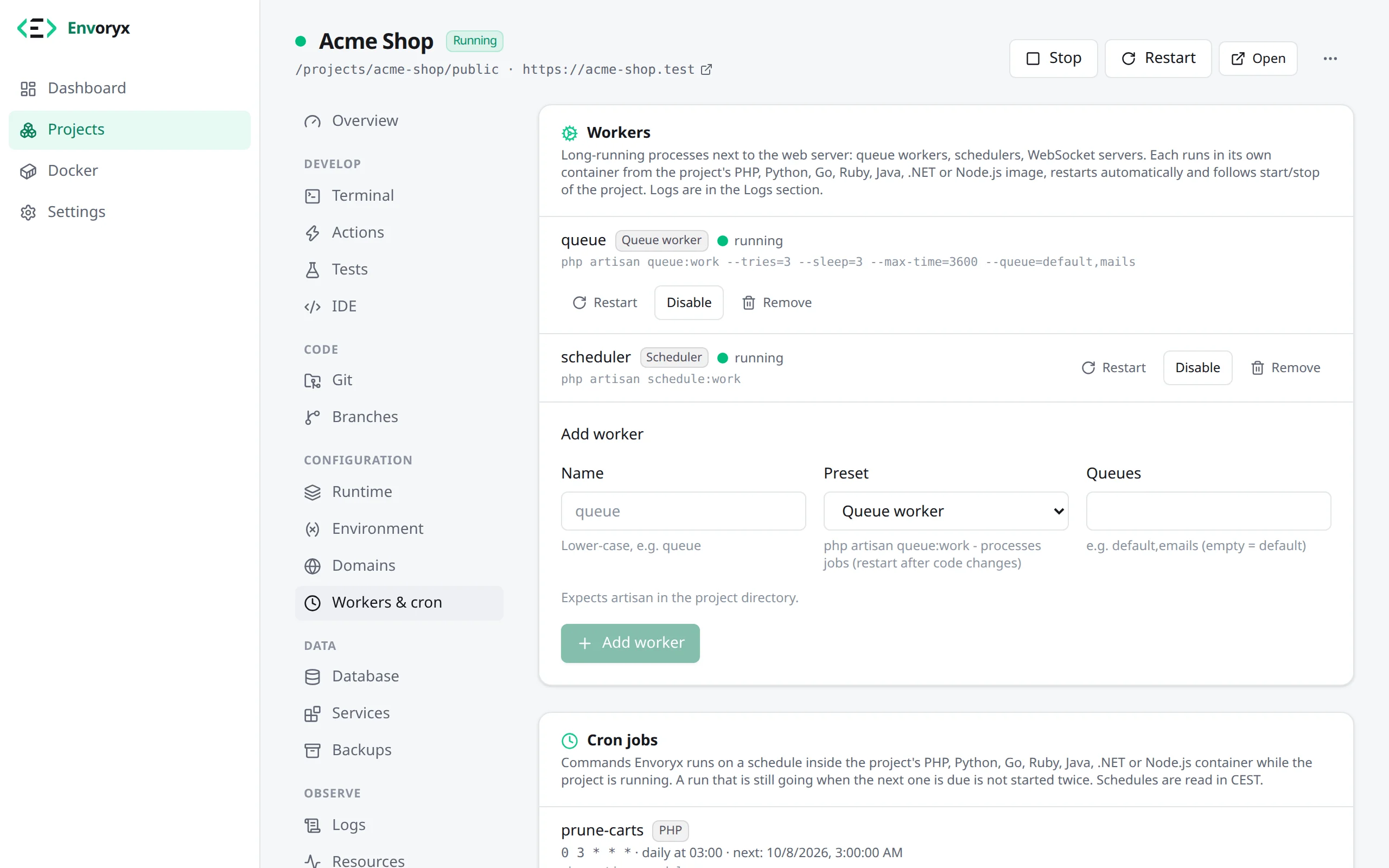
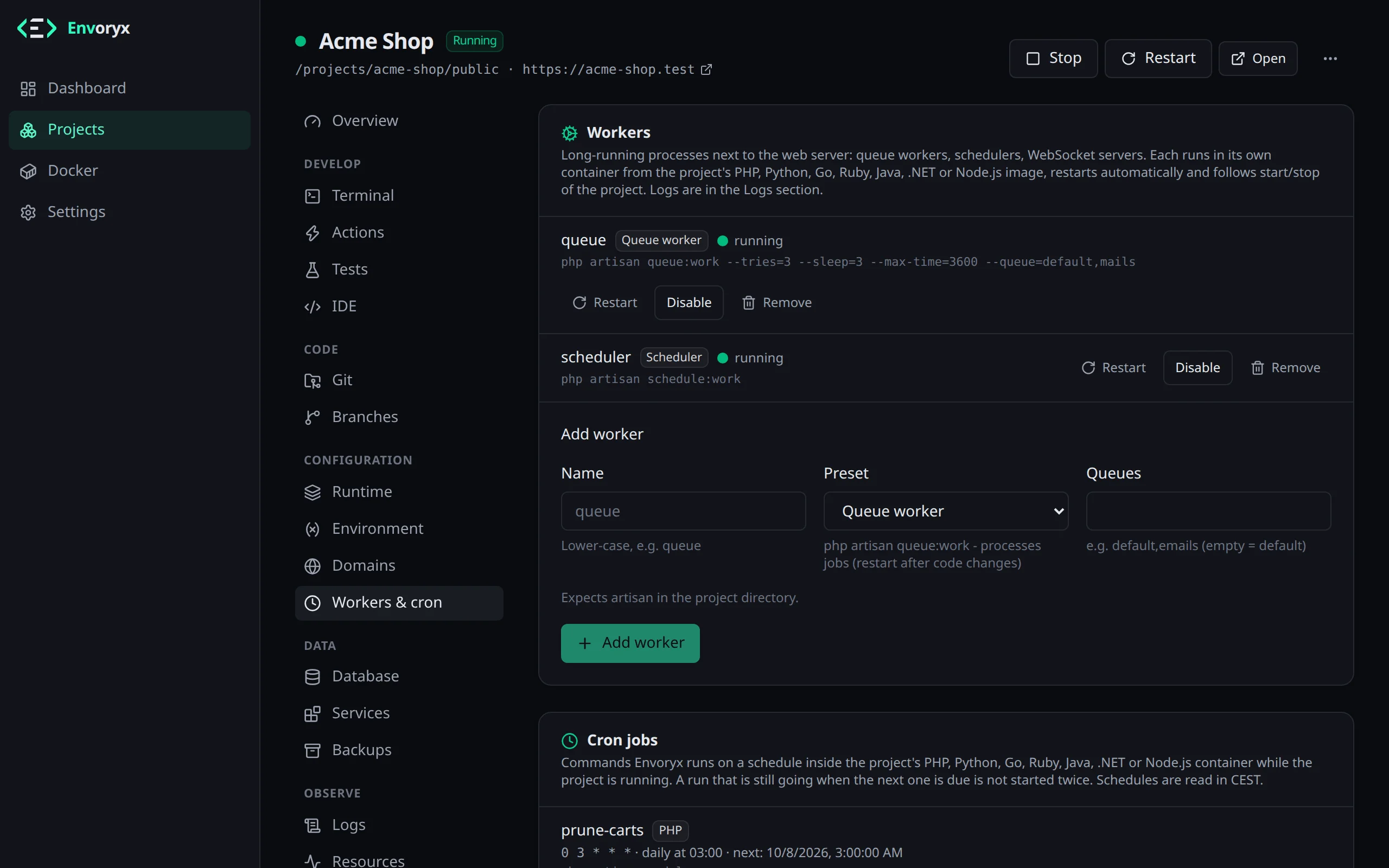
Workers
Section titled “Workers”A worker is a process that runs all the time next to your app - a queue worker, a scheduler, a WebSocket server. You add one in the project’s Workers & cron section and pick what it should run from a list of presets:
| Runtime | Presets |
|---|---|
| PHP | Laravel Scheduler (schedule:work), Queue worker (queue:work, queue names), Queue listener (queue:listen), Horizon, Reverb; Symfony Messenger consumer (transports) and Symfony Scheduler; Shopware Message queue and Scheduled tasks; Craft queue; PHP script; Composer script |
| Node.js | npm script (npm run <name>), Node.js script (node <file>) |
| Python | Python script, Python module (python -m), Django manage.py command, Celery worker, Celery beat |
| Go | Go program - builds a package of the module and runs the binary |
| Ruby | Solid Queue (bin/jobs start), GoodJob (optional queues), Sidekiq (optional queues; add Redis), Rake task, Ruby script |
| Java | Jar file (java -jar <file>), Build tool goal (mvn <goal> or gradle <task>) |
| .NET | Project (publishes the project, then runs it), DLL (dotnet <file>) |
Each worker gets its own container (envoryx-<project>-worker-<name>) from the image of its
runtime. It runs as the project owner with the project’s environment, restarts by itself if it
crashes and starts, stops and restarts together with the project. It runs under Docker’s init and
gets a SIGTERM when it’s stopped, so a stop or restart takes effect at once instead of waiting 30
seconds for the kill. A job it’s working on at that moment is cut off, though, so for a clean hand
over use your framework’s own command (see below). You’ll only see presets for
runtimes the project actually has. If you remove a runtime, its workers pause and come back once
the runtime does. The form starts with the preset that fits the project: Shopware’s message queue in
a Shopware shop, Craft’s queue in Craft, Laravel’s queue worker next to an artisan, the Messenger
consumer in a Symfony app with Messenger.
A few details save some head-scratching. Ruby workers run bundle install first when the
bundle is incomplete, and they get the same environment as the server (RAILS_ENV and so on).
That check happens when the worker starts, though: a running worker keeps the gems it started
with, so after bundle add or another change to the Gemfile, Restart the worker to load
the new bundle.
A Solid Queue worker whose tables are missing waits with a hint in its log instead of restarting
in a loop; run rails db:prepare and it carries on (the Rails template gives Solid Queue its own
<database>_queue database, see the Ruby page).
The recurring tasks from config/recurring.yml run inside that same worker, so you need neither a
second worker nor a cron job for them.
The Symfony Messenger consumer runs messenger:setup-transports for its transports first. That
creates the messenger_messages table the recipe’s doctrine://default?auto_setup=0 leaves to the
application, and while the database can’t be reached yet, the worker waits with a hint instead of
restarting in a loop.
Laravel’s queue:work stops after an hour on purpose, so the automatic restart picks up your
code changes; if you want changes to show up right away, use queue:listen. You don’t have to
wait for the hour, either: php artisan queue:restart in the PHP terminal tells the worker to
finish its current job and quit, and Envoryx starts it again with the new code. The Symfony
Messenger consumer also stops after an hour, and php bin/console messenger:stop-workers does
the same for it.
The npm script preset always calls npm run, even in a pnpm or Yarn project. That’s fine, since
npm runs the script from package.json just the same. The Composer script preset runs
composer run-script --timeout=0, so Composer’s usual limit of 300 seconds per script doesn’t
stop your worker after five minutes.
Node.js workers and the cron jobs in the Node.js container take their NODE_ENV from the dev
server: production while it serves a production build, development otherwise, also in a project
without a dev server. In development a NODE_ENV you set in the Environment section wins, just as it
does for the dev server; in production mode it’s production regardless. So a project that runs its production build doesn’t work through its queue in
development mode. Like the dev server, a Node.js worker waits for node_modules instead of
crashing, but it leaves the install to the dev server or to you. Python workers wait while the
.venv was built for another Python version, see the Python page.
The output of every worker is in the Logs section, and a project can have up to 10 of them.
Restart next to a worker restarts just that one container, while the rest of the project keeps running. You need it whenever a worker should pick up new code (a queue worker loads your application once, at its start) and once you’ve fixed whatever made it crash. A worker that exits again shortly after each start shows as restarting rather than running, and the project as partly running; its log tells you why. Docker waits a little longer before each new attempt, and the restart button skips that wait. Developers can restart workers too, adding and changing them stays with the project’s admins.
A new Laravel project from the template runs artisan migrate once it’s up, so the jobs, cache and
sessions tables are there before the queue worker starts. For a cloned or imported app, run the
migration from Actions yourself.
Cron jobs
Section titled “Cron jobs”Cron jobs, further down in the same Workers & cron section, run any shell command on a
schedule in the project’s PHP, Python, Go, Ruby, Java, .NET or Node.js container. Each runs as the project owner in the project directory, through sh -c - so
pipes and && work - and with the project’s environment.
You can pick a schedule (every few minutes, hourly, daily, weekly, monthly) or type a cron
expression; the form shows you when the next runs will be, which is a nice sanity check. The
times are in Envoryx’s time zone, so set TZ on the Envoryx container if they’re off. A new or
changed job first runs at the next time the form showed when you saved it; save an every-minute
job at 10:15:40, and it runs at 10:16.
Above the form are a few starting points for the runtimes the project has, among them Laravel scheduler, TYPO3 scheduler and Drupal cron. A click fills in the command and a schedule that suits it.
Jobs only run while the project runs, and a job that’s still running isn’t started a second time, so slow runs don’t pile up. A timeout (10 minutes by default, up to 24 hours) stops a command that hangs. Run now starts a job right away, which is handy while you set it up. The last 20 runs keep their output, and if a run fails, you get a notification.
Shops and CMSs
Section titled “Shops and CMSs”Shopware
Section titled “Shopware”A Shopware shop wants two workers, and both have a preset. Message queue runs
messenger:consume async low_priority and sets up both transports before it starts. Scheduled
tasks runs scheduled-task:run, which puts Shopware’s tasks on the queue when they’re due, so it
does nothing useful without the first one. Both restart every hour with a memory limit of 512 MB,
which keeps a slow leak from growing. Leave the Symfony Scheduler preset alone: it consumes
scheduler_default, which isn’t what Shopware uses. The PHP page
explains how to switch off the admin worker, which otherwise does the same work while the admin is
open.
workers: - {name: queue, preset: "shopware:queue"} - {name: scheduled-tasks, preset: "shopware:scheduled-tasks"}TYPO3, Drupal and Craft
Section titled “TYPO3, Drupal and Craft”TYPO3 and Drupal only need a cron job, and the cron form has a starting point for each. TYPO3’s
scheduler runs with vendor/bin/typo3 scheduler:run every minute. It’s an extension of its own,
typo3/cms-scheduler: the TYPO3 template installs it, but a TYPO3 you brought along may not have it,
and the job then fails with There are no commands defined in the “scheduler” namespace. Run
composer require typo3/cms-scheduler and vendor/bin/typo3 extension:setup in the PHP terminal
once. Drupal runs its cron with
vendor/bin/drush cron every 15 minutes, which is plenty; the run is silent, so an empty output is
normal. Craft works through its queue while someone has the control panel open. The Craft queue
preset (php craft queue/listen) does it without that, so image transforms after an upload get
done even when nobody’s looking.
In envoryx.yml
Section titled “In envoryx.yml”Workers and cron jobs are part of the project manifest, so they travel with the repository:
workers: - {name: queue, preset: "laravel:queue", arg: default}cron: - {name: prune, schedule: "0 3 * * *", command: php artisan model:prune, timeout: 5m}From the command line
Section titled “From the command line”The CLI does the same from a shell or a pipeline:
envoryx worker add shop queue --preset laravel:queue --arg defaultenvoryx cron add shop prune --schedule "0 3 * * *" --max-time 5m -- php artisan model:pruneenvoryx cron run shop prune --wait # runs it now and ends with its exit code